

Literally, a network is a group of people or objects that can share information and communicate with one another. But what does “network” mean in information technology? Computer networks, commonly called networks, consist of computer
Literally, a network is a group of people or objects that can share information and communicate with one another. But what does “network” mean in information technology? Computer networks, commonly called networks, consist of computer systems, network-related hardware and software, and communication equipment such as network cables or wireless devices. A network is generally divided into hardware (passive) and software/active equipment (active) sections.
Passive equipment includes various cables, connectors, network sockets, racks, and more.
Active equipment includes switches, hubs, routers, firewalls, and more.
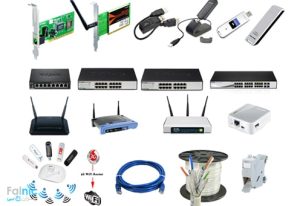
Computer networks include both software and hardware components.
Looking at the history of computer networks takes us back to the late 1960s, when the U.S. Department of Defense launched an advanced research agency in response to the Soviet Union’s satellite activities. This research agency was called ARPA. This agency carried out highly important research projects in strategic and defense fields. One such project was creating resilient communications for potential wartime conditions. For this purpose, the first computer network was established between four computers: two at MIT, one at the University of California, and one at the Stanford Research Center. This was the ARPANET network.
What does a network do?
A computer network establishes communication between systems so users can share data and equipment with one another.
In answer to the question “What is a network used for?”, computer networks connect systems and allow users to share data and devices such as printers. IT administrators can also manage large numbers of computers more easily and apply organizational policies. These are only some of the benefits and purposes of computer networks; below we examine the concept in more detail.
Common computer-network terms:
What is a client?
A client is a system that sends a request, which is then processed and answered by a server. For example, when your computer is connected to and using a network, your system functions as a client.
What is a server?
A server is an always-on computer with strong hardware and software resources that acts as a central system and provides services to clients. It is worth noting that both clients and servers have their own operating systems. In client-server networks, computers are connected but remain independent. If one computer or digital device is turned off or leaves the network, the network itself continues to operate. However, if the server goes offline, the services it provides become unavailable and the normal operation of the network is disrupted. (For more information about servers, you can read the Falnic article at this link titled “What is a server?”.
What is a host?
A host is any device or system connected to a network that provides services or uses services available on the network. By this definition, both clients and servers are hosts.
What is a network used for?
Regardless of physical distance, computer networks can support anything from two computers to an organization with two million computers or more. Networks are built for different purposes; users can access resources and data centrally and across locations, or communicate with each other by voice and video. Files, hardware, software, and other resources can be shared on a network, and users can use them according to their access permissions.
Types of computer networks; By size and geographic scope
Network PAN What is a PAN or personal area network?
PAN stands for Personal Area Network and is the smallest type of network. Personal networks consist of a limited number of computers and digital devices located only a few meters apart and connected by wired or wireless means.
For example, when you connect your mobile phone to a computer via Bluetooth, you create a personal area network (PAN).
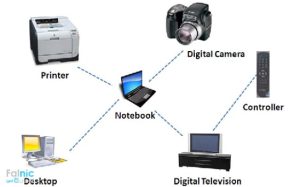
Whenever you connect two digital devices by wire or wirelessly using technologies such as Wi-Fi or Bluetooth, you create a personal network.
LAN stands for Local Area Network, also called a local area network . These networks usually provide high speeds and are deployed in limited areas such as a small company or a building. One technology widely used in this type of network is Ethernet.
MAN stands for Metropolitan Area Network and covers an area comparable to a city or a large urban region. For example, connecting the branches of an organization to one another within a city is an example of a MAN.
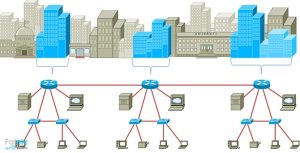
This term is short for Wide Area Network and is formed by interconnecting several LANs. These networks are typically used between cities, countries, or even continents. For internal connections of networks WAN ISPs and telecommunications infrastructure are required. Technologies used in this type of network include ISDN, MPLS, ATM, and others.
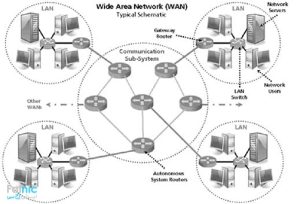
A WAN is not limited to a specific area, city, or locality and can provide international connectivity.
GAN, short for Global Area Network, refers to global wide-area networks without geographic limitations.
WLAN refers to wireless local area networks and stands for Wireless Local Area Network. One advantage of these networks is that users can move around without requiring a physical connection. IEEE 802.11a is one of the standards used by this type of network.
In this type of network there is no centralized management, and clients connect directly to each other. There is no server, and each client can act as both a server and a client. Peer-to-peer networks, usually used in environments with fewer than 10 clients, have relatively low setup costs. In the Windows operating system, this type of network is known as a Workgroup. The main purpose of this type of computer network is to connect systems and digital devices and enable file and data sharing.
These networks are usually deployed in larger environments, with clients acting as service users and servers acting as service providers. In these networks, servers are used to store network files, and every user has a defined access level.
Domain networks are a type of client-server network in which users can access network services. Network administrators can also manage all users easily and maintain network security and stability. Computers and digital devices in this type of network join a domain and receive a name and address under that domain.
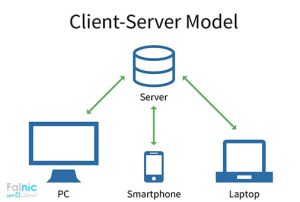
In client-server networks, a specific system operates as the service provider, and its presence is necessary for client services to remain available.
The internet is a very large global network through which people can easily send and receive many kinds of data from one continent to another. It can be accessed using devices such as modems or through mobile internet networks. Well-known internet protocols include HTTP, HTTPS, and FTP.
An intranet is a restricted private network usually established by an organization or large company and uses protocols similar to those of the internet. The difference is that its data is not accessible outside the network, and people outside the organization cannot access its information. An example is an automation network connecting bank branches that only the bank’s employees can access.
An extranet is a combination of the internet and an intranet. In simple terms, it is a secure network operating in an online environment that authorized people inside and outside an organization can access.
The difference between an intranet and an extranet is that an intranet is generally an internal network with servers located within the organization, and people outside the organization cannot use it. An extranet, however, operates online and across locations, allowing external people such as business partners and customers to use the network securely.
Before setting up a network, its architecture should be considered. One important element in network design and architecture is topology, also known as network layout . Topology refers to the physical arrangement and architecture of network components and how they are connected to one another.
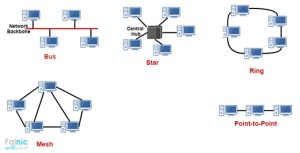
Network topology is essentially the architecture and structure you choose for your network.
In this topology, all systems connect to a main cable called the trunk, also known as the backbone. One advantage is low setup cost because no special central device is required. One disadvantage is that if the trunk cable is cut, the entire network stops working or goes down.
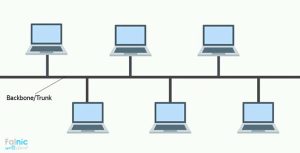
In bus topology, a break in the main path can interrupt the entire system.
In this topology, all clients connect to a central device, usually a switch or hub. This is one of the most common network topologies. Among the advantages of star topology is that if one device loses its connection, the other systems are not affected. These networks are also easy to manage and troubleshoot. One disadvantage is that if the central device fails, the entire network goes down.
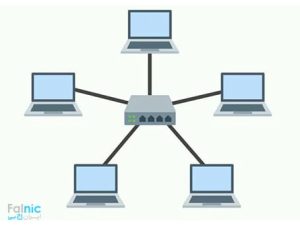
In computer networks with a star structure, all devices connect to a central device.
In ring networksclients connect to a device called an MAU. This network has a ring structure, meaning a packet must first obtain the token and then pass through clients around the ring until it reaches its intended destination.
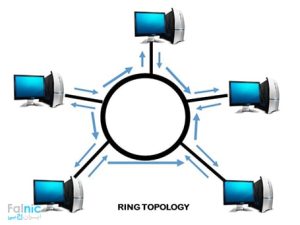
Token Ring computer networks
In this network, clients connect directly to all other clients through multiple paths. This topology offers high security and fault tolerance, but requires more cables and ports for clients and therefore costs more.
Mesh topology is divided into two categories:
Full mesh: every system has a direct connection to every other system.
Partial mesh: each system connects only to several systems, not all of them.
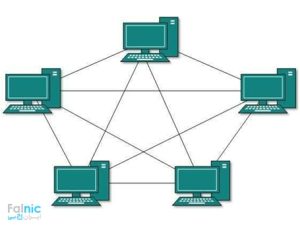
In mesh topology, all systems are interconnected. It resembles a web stretched between all of them.
This topology combines several topology types to provide the best network performance under different conditions.
For example, the image below shows a combination of Bus and Star topologies.
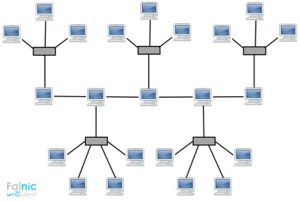
A hybrid topology in computer networks combines several topology types in one network.
This topology is specifically for wireless networks which are widely used today. One disadvantage of this topology is its lower security. In a wireless network, devices can communicate in the following two ways:
In this topology, devices create a network directly through their wireless network cards without any additional equipment.
In this topology, network components communicate through a device called an access point. This topology provides greater stability and speed than an ad-hoc topology.



